Streamlining customer responses is a crucial element for any business looking to gather feedback, process orders, or encourage donations. An effective and properly formatted Usps Business Reply Mail Template is the key to unlocking this potential, providing a frictionless way for your audience to communicate back to you. This service, offered by the United States Postal Service, allows companies to pre-pay the postage on behalf of their customers, a simple gesture that can dramatically increase response rates. However, the process is far from just printing your address on an envelope; it involves a strict set of design and formatting rules that must be followed precisely.
Navigating the world of Business Reply Mail (BRM) can seem daunting at first. The specific requirements for barcodes, permit information, and layout are designed for the USPS's high-speed automated mail processing equipment. A single error in the design—an incorrect FIM mark, a misplaced barcode, or the wrong paper color—can lead to returned mail, unexpected surcharges, or a complete failure of your campaign. This isn't just an inconvenience; it can represent a significant financial loss in printing and opportunity costs.
Fortunately, mastering the components of BRM is entirely achievable. By understanding the anatomy of a compliant mailpiece, knowing where to find official resources, and following best practices for design and printing, you can leverage this powerful tool to your advantage. This guide will walk you through every critical aspect of Business Reply Mail, from the initial permit application to the final design approval. We will deconstruct the template, explore the official USPS tools available to you, and highlight common mistakes to ensure your next direct mail campaign is a resounding success.
Understanding Business Reply Mail (BRM)
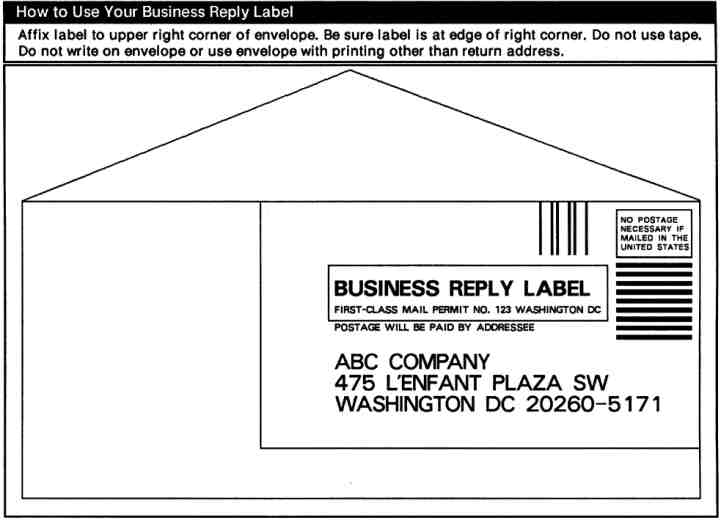
Business Reply Mail is a service provided by the USPS that enables a sender to distribute pre-printed, self-addressed envelopes, postcards, or labels to customers with the postage prepaid. When a customer uses the BRM piece to reply, the original sender (the permit holder) pays the First-Class Mail postage plus a per-piece handling fee. This system shifts the cost and effort of replying from the customer to the business, making it an incredibly effective tool for marketing and communication.

The Core Benefits for Your Business
The primary advantage of using BRM is the significant boost in response rates. By removing the need for a customer to find a stamp, you eliminate a major point of friction in the reply process. This is particularly valuable for a variety of business activities:
- Marketing and Lead Generation: Including a BRM card in a direct mail campaign makes it easy for potential clients to request more information or a quote.
- Surveys and Feedback: Companies can gather valuable customer insights and market research data by providing a simple, free way to return completed surveys.
- Non-Profit Fundraising: Charitable organizations rely heavily on BRM to make the donation process as seamless as possible for their supporters.
- Subscription Renewals: Publishers and subscription-based services can simplify the renewal process, reducing customer churn.
- Product Returns: While less common, some e-commerce businesses may use a form of reply mail to facilitate easier returns.
Beyond increased engagement, BRM is also cost-effective because you only pay for the pieces that are actually returned. This is far more efficient than pre-stamping thousands of envelopes, many of which may never be used.
Who Uses BRM?
The applications for Business Reply Mail are diverse and span across numerous industries. Any organization that wants to encourage a response from a wide audience without placing the burden of postage on them is a prime candidate. Common users include universities seeking applications, financial institutions for account-related forms, healthcare providers for patient paperwork, and government agencies for official forms and surveys. The professional appearance and convenience of BRM signal to the recipient that their response is valued.
Deconstructing the Usps Business Reply Mail Template
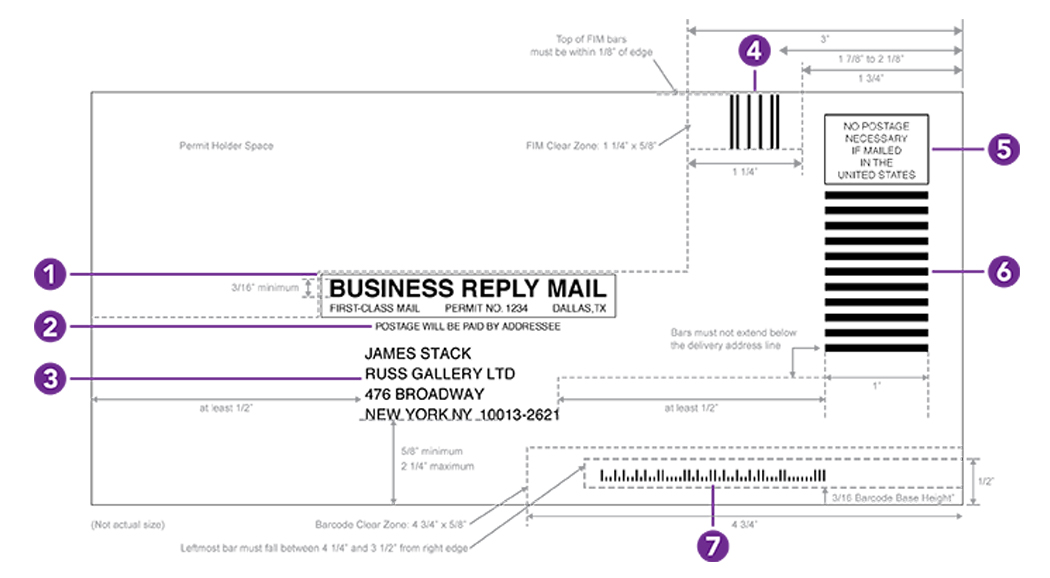
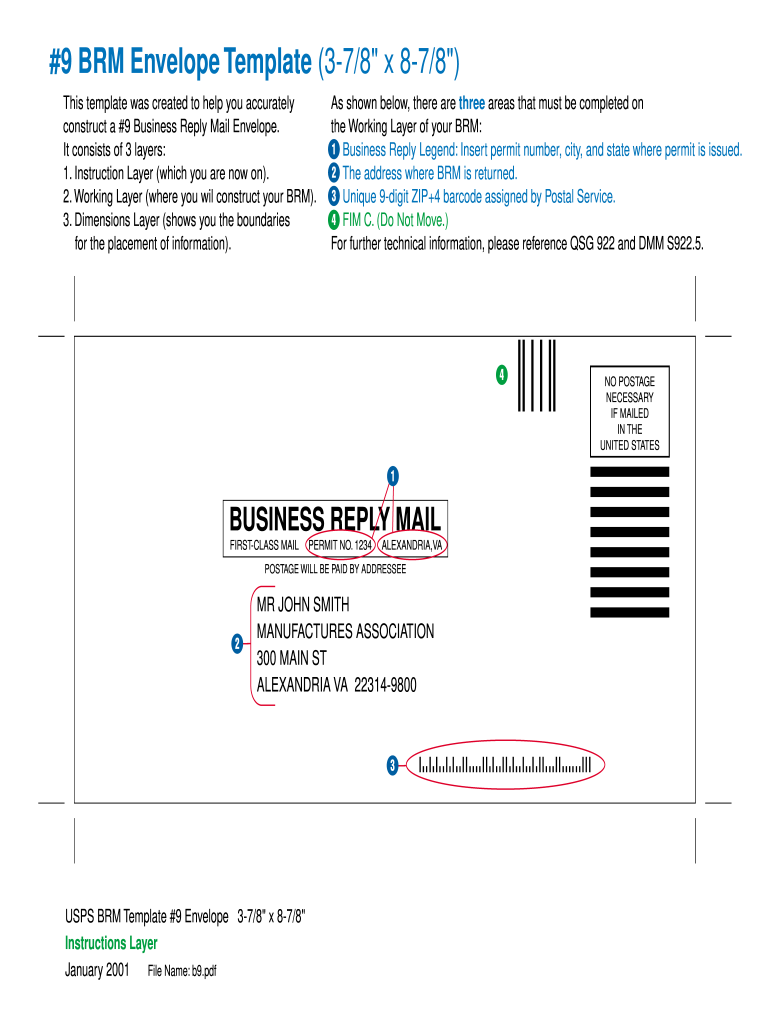
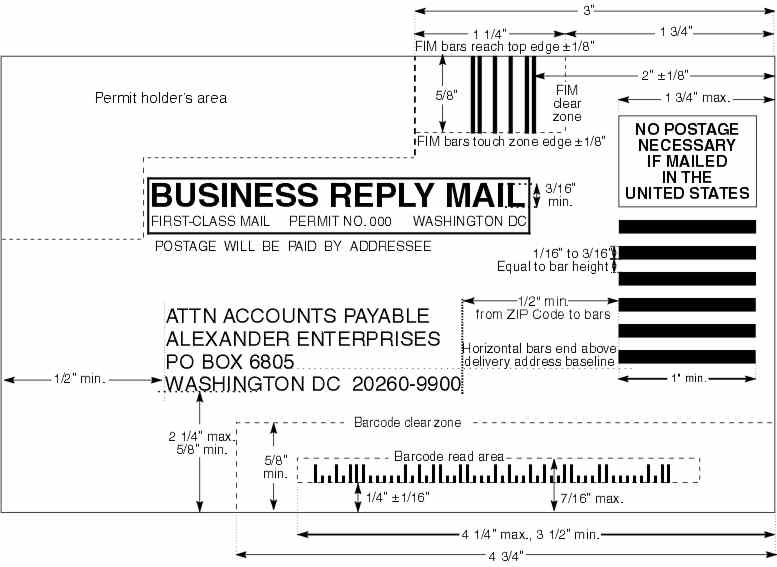
A compliant BRM mailpiece is a precisely engineered document. Every element has a specific purpose and location, designed to be read by automated sorting machines. Understanding these components is the first step toward creating a successful template.
The FIM (Facing Identification Mark)
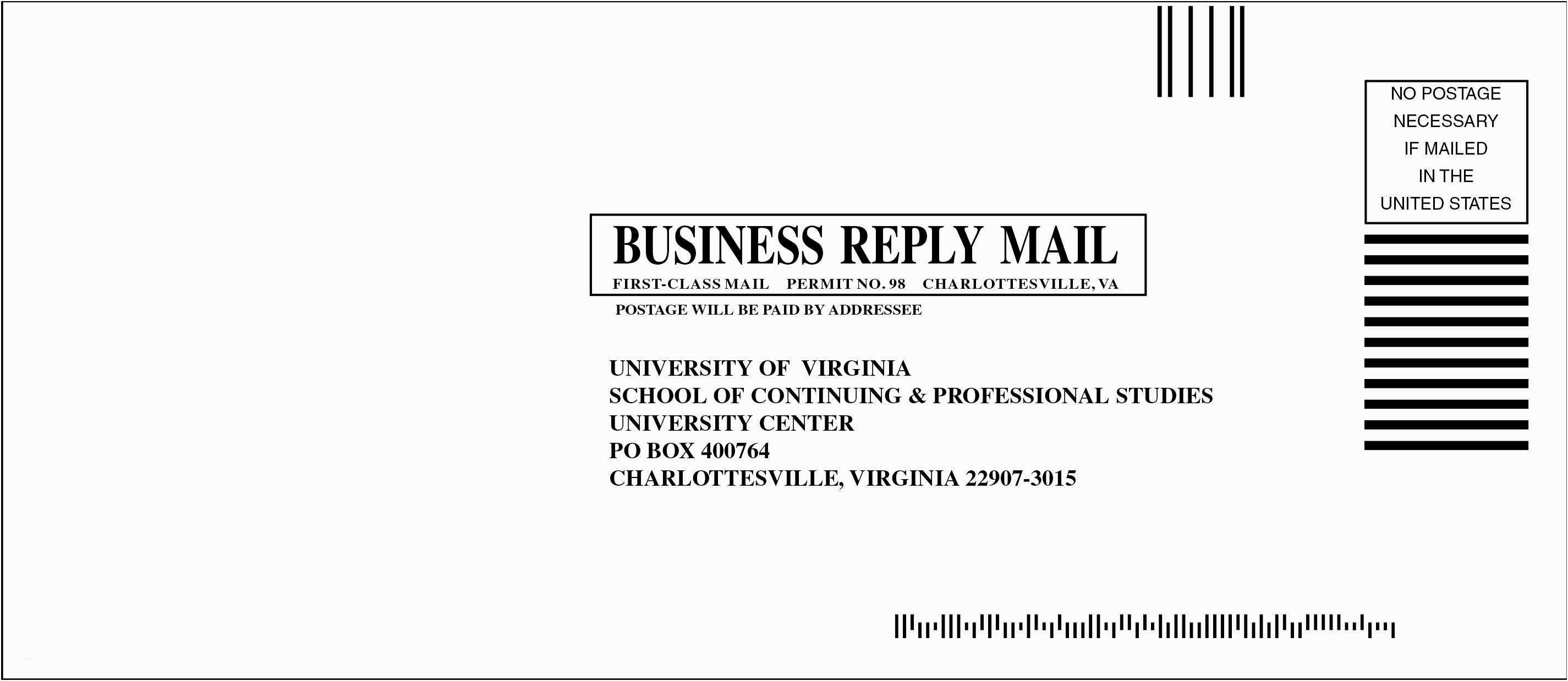
The Facing Identification Mark (FIM) is a series of vertical bars printed in the top right corner of the mailpiece, to the left of the area reserved for the postage stamp. Its purpose is to tell USPS automated equipment what kind of mailpiece it is. For Business Reply Mail, you will typically use FIM C. This mark indicates that the mailpiece contains a pre-printed barcode and is intended for automated processing. FIM B is used for BRM cards that do not have a pre-printed barcode and will be processed manually, which incurs higher fees.
The Barcode
The barcode is arguably the most critical element for automated processing and cost-effective BRM. The current standard is the Intelligent Mail Barcode (IMB). This is a 65-bar code that consolidates information previously held in two separate barcodes (POSTNET and PLANET). The IMB encodes the ZIP+4 code of the destination address, a unique identifier for the mailer, the mailpiece type, and allows for tracking services. The barcode must be placed within a specific "clear zone" at the bottom of the mailpiece and meet strict print quality standards.

The Permit Information
Several lines of text are required to identify the piece as BRM and link it to your permit account. These must appear above the delivery address:

- "BUSINESS REPLY MAIL": This must be printed in all capital letters, typically above the permit line.
- "FIRST-CLASS MAIL PERMIT NO. [XXXX] CITY, STATE": This line identifies your unique permit number and the city and state of the Post Office where the permit is held.
- "POSTAGE WILL BE PAID BY ADDRESSEE": This text informs the recipient (and postal workers) that you, the permit holder, will be covering the cost of postage.
The Delivery Address
The delivery address must be clear, complete, and printed in a sans-serif font like Arial or Helvetica. It should include the company name and the full delivery address. Crucially, the USPS will assign you a unique ZIP+4 code specifically for your Business Reply Mail. This specialized ZIP code is essential for routing the mail directly to your account for proper billing and handling. You cannot use your standard business ZIP code for BRM.

The "NO POSTAGE NECESSARY" Box
In the upper right corner, where a stamp would normally be placed, a specific box or indicia must be printed. This box contains the phrase "NO POSTAGE NECESSARY IF MAILED IN THE UNITED STATES". This clearly communicates to the user that they do not need to affix a stamp.
Horizontal Bars
A series of horizontal bars must be printed directly below the "NO POSTAGE NECESSARY" indicia. These bars serve as another visual cue for postal sorting equipment, helping to quickly identify the mailpiece as Business Reply Mail.
Finding and Customizing Your BRM Template
Given the strict formatting requirements, you should never try to create a BRM design from scratch without guidance. The USPS provides official tools and resources to ensure your mailpiece is 100% compliant, saving you time, money, and headaches.
Step 1: Applying for a BRM Permit
Before you can design anything, you must have a valid BRM permit with the USPS. This involves a few key steps:
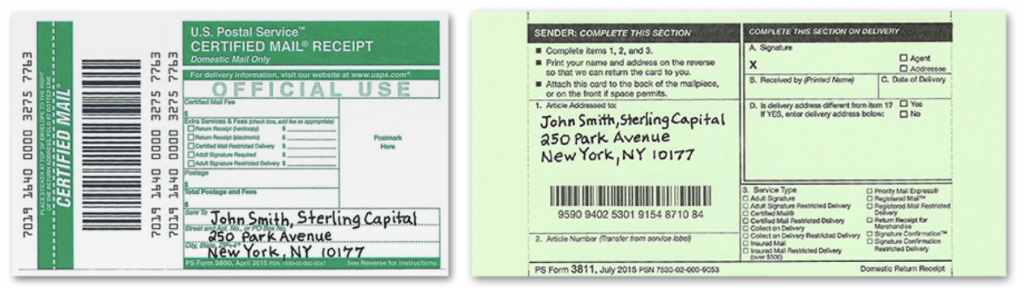
- Obtain a Mailing Permit: First, you need a general mailing permit. This is done by submitting Form 3615, Mailing Permit Application and Customer Profile, to the Post Office where you intend to receive your reply mail.
- Pay the Fees: There is an annual permit fee for Business Reply Mail. You will also need to establish a postage account (often called an advance deposit account) from which the postage and per-piece fees for returned mail will be deducted. Some BRM types may also have an annual account maintenance fee.
Your local Post Office business mail entry unit (BMEU) can guide you through this application process.

Step 2: Accessing Official USPS Tools
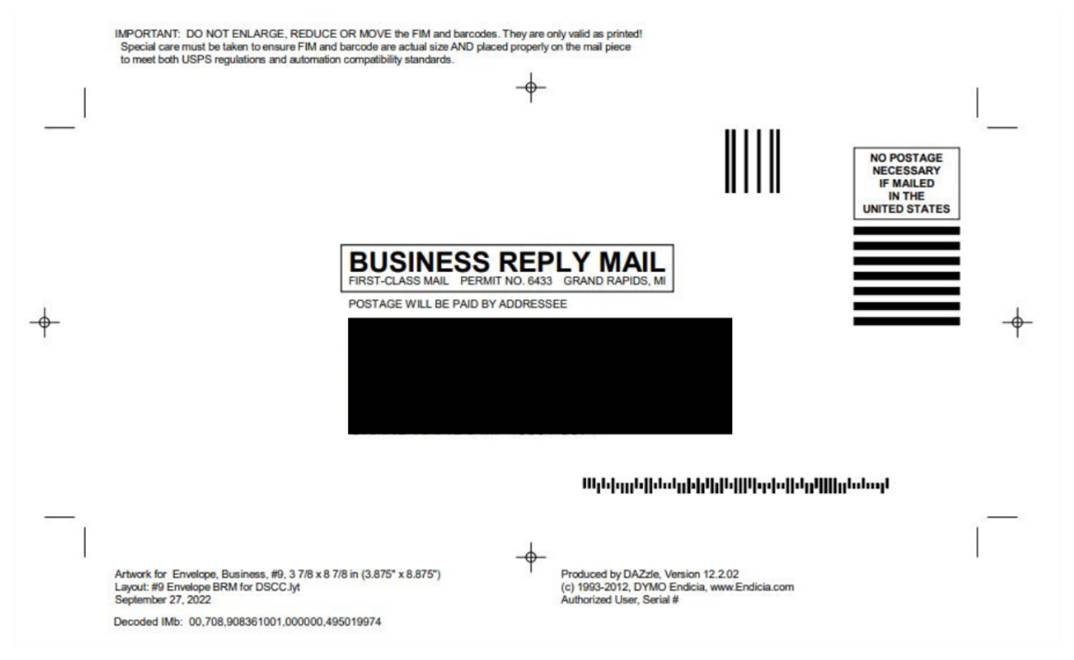
The best and safest way to get a compliant Usps Business Reply Mail Template is to use the Automated Business Reply Mail (ABRM) tool available on the USPS Business Customer Gateway. This free online tool is designed to eliminate guesswork. You simply enter your permit information, delivery address, and mailpiece dimensions, and the ABRM tool generates a camera-ready, high-resolution PDF of your BRM design. This file includes all necessary elements—the FIM C, the correct IMB, the permit text, and proper placement—and is guaranteed to be compliant.
Step 3: Using Third-Party Templates and Software
While some graphic design software and online printers offer BRM templates, you should approach them with caution. The USPS regularly updates its requirements, and a third-party template may be outdated. If you choose to use one, it is absolutely essential that you submit your final design proof to a USPS Mailpiece Design Analyst (MDA) for approval before you print anything. This is a free service offered by the USPS, and it can save you from a costly printing mistake.

Critical Design and Printing Considerations
A perfectly generated template can still fail if it's not printed correctly. The physical characteristics of your mailpiece are just as important as the digital design.
Size and Weight Requirements
BRM pieces must conform to specific dimensions to be processed by automated equipment.
* Postcards: Must be between 3.5" x 5" and 4.25" x 6".
* Envelopes/Letters: Must be between 3.5" x 5" and 6.125" x 11.5".
The thickness must be between 0.007" and 0.25". Mailpieces exceeding these dimensions may be subject to non-machinable surcharges.
Paper Stock and Color
The goal is machine readability. Use a light-colored, non-glossy paper stock for your mailpiece. White, cream, or light pastel colors are ideal. The ink should be dark, preferably black, to ensure high contrast for the scanners to read the barcode and address. Avoid dark paper, busy backgrounds, or reflective, glossy coatings, as these can interfere with the sorting machines.
The Clear Zone
The area at the bottom of the mailpiece is reserved for the IMB. This "clear zone" must be kept completely free of any other printing, logos, or address information. For a standard letter-sized envelope, this zone is generally the bottom 5/8 inch of the mailpiece. The ABRM tool will automatically ensure your design respects this critical area.
Getting Your Design Approved
We cannot stress this enough: always get your design approved by a USPS Mailpiece Design Analyst (MDA) before printing a large quantity. The MDA will review your design for free and confirm that it meets all current postal regulations regarding size, layout, barcode quality, and paper stock. You can find contact information for your local MDA on the USPS website. This single step can prevent the loss of thousands of dollars in unusable printed materials.
BRM, CRM, and PRM: What's the Difference?
Business Reply Mail is not the only option for facilitating customer responses. It's important to understand the alternatives to choose the most cost-effective solution for your specific campaign.
Business Reply Mail (BRM)
As discussed, with BRM you pay postage plus a handling fee only for the pieces that are returned. This is the best option when you are uncertain about the response rate, as you don't pay for unused mailers. The per-piece cost is higher than a standard First-Class stamp, but the overall campaign cost can be lower if response rates are modest.
Courtesy Reply Mail (CRM)
Courtesy Reply Mail consists of a pre-addressed envelope or card that you provide to your customer, but the customer must affix their own stamp. You do not need a permit for CRM. This method is best for transactional mail like billing statements, where the customer is highly motivated to reply and is accustomed to paying for postage. It's cheaper for the business but results in a lower response rate than BRM.
Permit Reply Mail (PRM)
Permit Reply Mail allows a permit holder to prepay postage on replies by printing a special First-Class Mail permit indicia on the mailpiece. With PRM, you pay postage on all the reply pieces you distribute, regardless of whether they are returned. This is only cost-effective for campaigns where you are virtually guaranteed a near-100% response rate, making it a much less common choice than BRM.
Avoiding Common Pitfalls with Your Usps Business Reply Mail Template
Many businesses make preventable mistakes when launching a BRM campaign. Being aware of these common errors can help you ensure a smooth and successful process.
- Forgetting the Permit: You cannot receive BRM without a valid permit and an active postage account. This is the foundational first step.
- Incorrect Barcode: Using an outdated POSTNET barcode, a poorly printed IMB, or placing the barcode outside the designated clear zone will cause processing errors and surcharges.
- Wrong FIM Mark: Using FIM B on a piece with a barcode, or FIM C on a piece without one, will confuse the sorting equipment.
- Ignoring the Clear Zone: Placing a tagline, border, or graphic in the IMB clear zone at the bottom of the mailpiece is a guaranteed way to have it rejected by automated sorters.
- Poor Contrast: Printing on dark, patterned, or glossy paper with light-colored ink makes it impossible for machines to read the address and barcode.
- Skipping MDA Approval: The most costly mistake is printing thousands of mailpieces without getting a free review from a USPS Mailpiece Design Analyst. What might look correct to you may have a subtle flaw that makes the entire batch unusable.
Conclusion
A well-executed Business Reply Mail campaign is a powerful asset for enhancing customer communication and driving responses. While the technical requirements are exacting, they are not insurmountable. The key to success lies in understanding the distinct elements that make up a compliant Usps Business Reply Mail Template, from the FIM and IMB to the specific permit text and address format.
By leveraging the official USPS Automated Business Reply Mail (ABRM) tool, you can generate a flawless, camera-ready design with confidence. Remember to follow best practices for printing, including using high-contrast colors on appropriate paper stock and respecting all size, weight, and clear zone requirements. Most importantly, make the free review by a USPS Mailpiece Design Analyst a mandatory step in your workflow before any large print run.
By following this structured approach, you can avoid common pitfalls, control your costs, and effectively utilize Business Reply Mail to achieve your business objectives, making it easier than ever for your customers to connect with you.
0 Response to "Mastering Usps Business Reply Mail Template"
Posting Komentar